REALbasicにAppleScriptを内包する。
まずAppleScriptを作成します。
AppleScriptは
on run()
〜
end run
の間に記述します。値を受け取りたい場合は
on run(pageNum)
のようにカッコ内に記述します。この受け取る値は
数値integerか文字列stringしか受け取れません。
また受け取った数値は
set pageNum to pageNum as number
の用にAppleScriptは側で数値として再定義してあげないといけません。
on run(pageNum,boxNum)
のように複数の値を受け取ることもできます。
また値を返すには
return pageNumのようにしてあげます。
ただし、こちらは数値で返してもリストで返しても
REALbasic側では文字列として受け取ります。
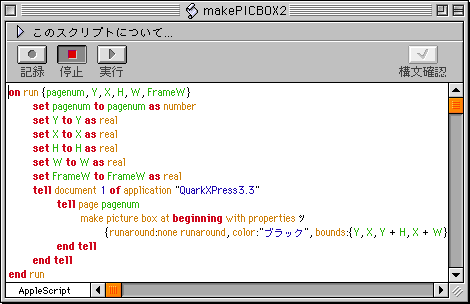
スクリプトが完成したらコンパイル済みスクリプトとして
名前を付けて保存します。
作成したコンパイル済みスクリプトをプロジェクトウィンドウに
ドロップします。これでAppleScriptの組み込みが完成です。
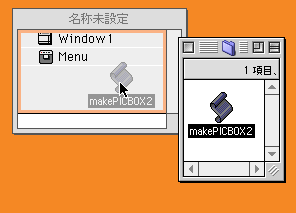
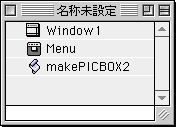
これをREALbasicから呼び出すには
保存した名前で
dim retext as string
reText = getpicbox2(2)
のように呼び出します。
返す値がなくても値を受け取らなくてはうけません。
まぁ返す値が無くてもエラー情報などは返したほうがよいでしょう。
--AppleScriptを呼び出すにはコツ
REALbasicからAppleScriptを呼び出すにはコツがありました。
下記のAppleScriptをコンパイル済みスクリプトとして保存し
REALbasicに埋め込んで、
●AppleScript部分
on run (pagenum)
set Y to 100
set X to 100
set H to 50
set W to 20
set FrameW to 0
tell document 1 of application "QuarkXPress3.3"
tell page pagenum
make picture box at beginning with properties ツ
{runaround:none runaround, color:"ブラック", bounds:{Y, X, Y + H, X + W}, frame:{width:FrameW}}
end tell
end tell
end run
下記で実行してもうまく動きません。
●REALbasic部分
dim retext as string
reText = makePICBOX(2)
ところが下記のように
set pagenum to pagenum as number--★
送った変数をas numberで数値に再定義させてやるとうまく動きます。
●AppleScript部分
on run (pagenum)
set pagenum to pagenum as number--★
set Y to 100
set X to 100
set H to 50
set W to 20
set FrameW to 0
tell document 1 of application "QuarkXPress3.3"
tell page pagenum
make picture box at beginning with properties ツ
{runaround:none runaround, color:"ブラック", bounds:{Y, X, Y + H, X + W}, frame:{width:FrameW}}
end tell
end tell
end run
複数の数値を送ることも可能です。
●AppleScript部分
on run {pagenum, Y, X, H, W, FrameW}
set pagenum to pagenum as number
set Y to Y as real
set X to X as real
set H to H as real
set W to W as real
set FrameW to FrameW as real
tell document 1 of application "QuarkXPress3.3"
tell page pagenum
make picture box at beginning with properties ツ
{runaround:none runaround, color:"ブラック", bounds:{Y, X, Y + H, X + W}, frame:{width:FrameW}}
end tell
end tell
end run
●REALbasic部分
dim retext as string
reText = makePICBOX2(2, 30, 30, 50, 60, 4)
AppleScriptは整数と文字列パラメータしか送信できません。
つまりリスト形式や小数点を含む場合は不可になります。
また返り値はリストで返すと文字列になるようです。
●AppleScript部分
on run {pagenum}
tell document 1 of application "QuarkXPress3.3"
tell page pagenum
set myList to bounds of picture box 1
end tell
end tell
return myList
end run
●REALbasic部分
dim retext as string
reText = makePICBOX3(1)
返り値は
128.793 mm, 185.437 mm, 178.793 mm, 245.437 mm
になった。