Ruby tool for reconstructing JPG images from SatNOGS CSV on Linux

[Step 1] Automatically detect missing sequence numbers. [extract_missing.rb]
When reconstructing JPG images from HEX data using Marina satellite CSV data obtained
from SatNOGS, the parts of the data are frequently missing. I have created a Ruby script
that automatically detects missing sequence numbers in JPG image data.
 1. About Sequence Numbers
In the target data, a 4-digit sequence number is located at the 51st to 54th characters
of each line. For example,
0000 (Note) 0000(h) = 0000(d)
0080 0080(h) = 0128(d)
0100 0100(h) = 0256(d)
0180 0180(h) = 0384(d)
0200
0280 So, the intervals are all 0080(h)=0128(d).
0300
0380
:
In this way, it increases by 0x80 at a time.
The objective is to examine these sequence numbers in order, starting from the beginning
of the JPG data, and detect any missing numbers.
2. [extract_missing.rb] Characteristics
Previously, missing sequence numbers were manually identified from large volumes of CSV data.
https://www.asahi-net.or.jp/~ei7m-wkt/numb1191.htm#revision
https://www.ne.jp/asahi/hamradio/je9pel/60808mr4.htm#revision
For example, the missing sequences:
0200
0480
0780
0C00
I could handle it manually if there were only a few items. However, if there are 50, several
hundred, or several thousand missing items, the verification process becomes extremely arduous
and is effectively impossible to perform manually. So, I set it up to detect automatically using
Ruby. This script performs the following processing.
- Load extract72.txt (example).
- Set the entire area as the valid range for the JPG data.
- Extract the sequence number from the 51~54 characters of each line.
- Check against the pattern 0000, 0080, 0100, 0180, ...
- Automatically display the missing sequence numbers.
- Save the result as the missing_sequence.txt.
Particularly Important Points
The JPG data does not necessarily extend up to EE80. The actual end position of the JPG data
is determined to be the last line containing FFD9. This makes it possible to identify missing
sequences based on the actual length of the JPG data.
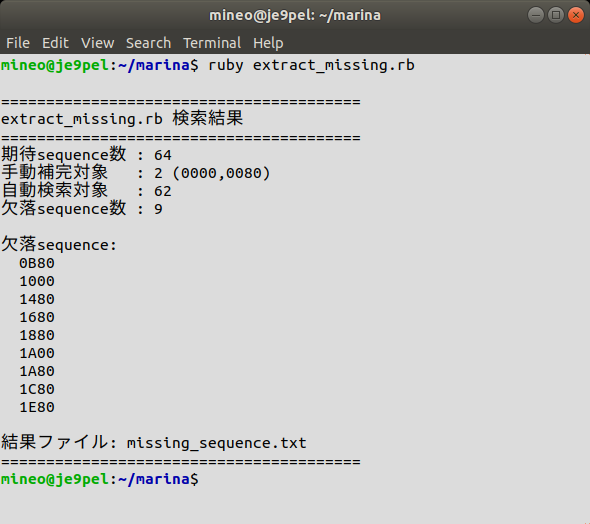
3. How to execute
Place extract72.txt and extract_missing.rb in the same folder.
$ ruby extract_missing.rb
When executed, the result is displayed as follows.
===========================
Sequence missing check
===========================
Missing sequence:
0200 missing
0480 missing
0780 missing
0C00 missing
Number of missing items: 4
It is displayed like this. At the same time, the results are also saved to
missing_sequence.txt.
4. The reason created this tool
In the JPG reconstruction of satellite images, there are cases where the data is incomplete.
Previously, to locate missing sequences, I would take a broad range of data from before and
after the gap and perform a process of "Copy the data -> Search other SatNOGS CSV files,
and -> Look for the corresponding entries".
This method is also acceptable when there is little missing data.However, it takes a
significant amount of time if there are a large number of missing sequences. With this
[extract_missing.rb], it's now possible to instantly identify exactly which sequences are missing.
5. Future Automation
I am currently taking things a step further and considering the next move.
extract72.txt
|
extract_missing.rb
|
missing_sequence.txt
|
Automatically search multiple SatNOGS CSV files
|
Identify data with missing sequences
|
Generate interpolation data
|
Reconstruct in sequence order
|
Convert to JPG image
I am considering such full automation.
In particular, by performing a batch search across multiple CSV files...
0200 -> xxxx.csv
0480 -> yyyy.csv
0780 -> xxxx.csv
0C00 -> zzzz.csv
If the system can automatically indicate exactly which CSV files contain
missing data in this way, the manual work can be reduced even further.
[Step 2] Automatically search for missing sequences across multiple SatNOGS CSV files.
(Next, Step 2)
The ultimate goal is to move toward full automation.
- Load extract72.txt (example).
- Set the entire area as the valid range for the JPG data.
- Extract the sequence number from 51~54 characters of each line.
- Check against the pattern 0000, 0080, 0100, 0180, ...
- Automatically display the missing sequence numbers.
- Save the result as the missing_sequence.txt.
1. About Sequence Numbers
In the target data, a 4-digit sequence number is located at the 51st to 54th characters
of each line. For example,
0000 (Note) 0000(h) = 0000(d)
0080 0080(h) = 0128(d)
0100 0100(h) = 0256(d)
0180 0180(h) = 0384(d)
0200
0280 So, the intervals are all 0080(h)=0128(d).
0300
0380
:
In this way, it increases by 0x80 at a time.
The objective is to examine these sequence numbers in order, starting from the beginning
of the JPG data, and detect any missing numbers.
2. [extract_missing.rb] Characteristics
Previously, missing sequence numbers were manually identified from large volumes of CSV data.
https://www.asahi-net.or.jp/~ei7m-wkt/numb1191.htm#revision
https://www.ne.jp/asahi/hamradio/je9pel/60808mr4.htm#revision
For example, the missing sequences:
0200
0480
0780
0C00
I could handle it manually if there were only a few items. However, if there are 50, several
hundred, or several thousand missing items, the verification process becomes extremely arduous
and is effectively impossible to perform manually. So, I set it up to detect automatically using
Ruby. This script performs the following processing.
- Load extract72.txt (example).
- Set the entire area as the valid range for the JPG data.
- Extract the sequence number from the 51~54 characters of each line.
- Check against the pattern 0000, 0080, 0100, 0180, ...
- Automatically display the missing sequence numbers.
- Save the result as the missing_sequence.txt.
Particularly Important Points
The JPG data does not necessarily extend up to EE80. The actual end position of the JPG data
is determined to be the last line containing FFD9. This makes it possible to identify missing
sequences based on the actual length of the JPG data.
3. How to execute
Place extract72.txt and extract_missing.rb in the same folder.
$ ruby extract_missing.rb
When executed, the result is displayed as follows.
===========================
Sequence missing check
===========================
Missing sequence:
0200 missing
0480 missing
0780 missing
0C00 missing
Number of missing items: 4
It is displayed like this. At the same time, the results are also saved to
missing_sequence.txt.
4. The reason created this tool
In the JPG reconstruction of satellite images, there are cases where the data is incomplete.
Previously, to locate missing sequences, I would take a broad range of data from before and
after the gap and perform a process of "Copy the data -> Search other SatNOGS CSV files,
and -> Look for the corresponding entries".
This method is also acceptable when there is little missing data.However, it takes a
significant amount of time if there are a large number of missing sequences. With this
[extract_missing.rb], it's now possible to instantly identify exactly which sequences are missing.
5. Future Automation
I am currently taking things a step further and considering the next move.
extract72.txt
|
extract_missing.rb
|
missing_sequence.txt
|
Automatically search multiple SatNOGS CSV files
|
Identify data with missing sequences
|
Generate interpolation data
|
Reconstruct in sequence order
|
Convert to JPG image
I am considering such full automation.
In particular, by performing a batch search across multiple CSV files...
0200 -> xxxx.csv
0480 -> yyyy.csv
0780 -> xxxx.csv
0C00 -> zzzz.csv
If the system can automatically indicate exactly which CSV files contain
missing data in this way, the manual work can be reduced even further.
[Step 2] Automatically search for missing sequences across multiple SatNOGS CSV files.
(Next, Step 2)
The ultimate goal is to move toward full automation.
- Load extract72.txt (example).
- Set the entire area as the valid range for the JPG data.
- Extract the sequence number from 51~54 characters of each line.
- Check against the pattern 0000, 0080, 0100, 0180, ...
- Automatically display the missing sequence numbers.
- Save the result as the missing_sequence.txt.

